Typing Speed Test
- Time: 60s
- WPM: 0
- CPM: 0
- Accuracy: 100%
Published on: Nov 26, 2025
You are typing at 80 WPM, flying through sentences, and then suddenly—you hit a date or a phone number. Your eyes dart down to the keyboard, your rhythm breaks, and your speed plummets. Sound familiar?
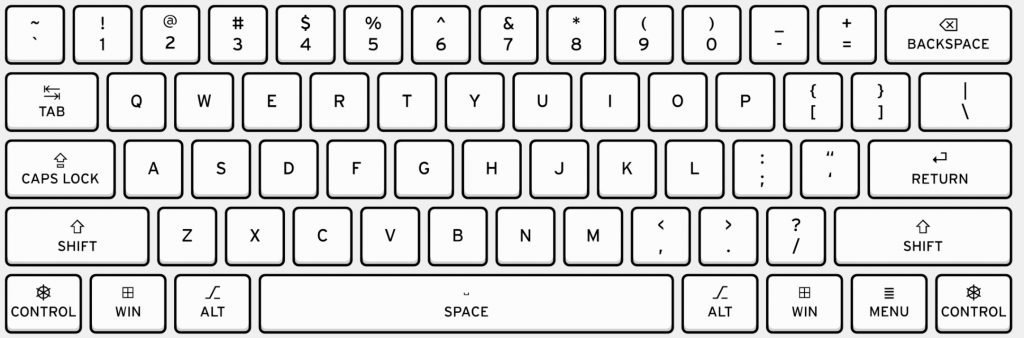
The Number Row is often the most neglected part of touch typing. Because it requires a longer stretch for your fingers, many typists rely on visual checks. However, looking down breaks your cognitive flow and focus.
To become a complete typist on typingtest.space, challenge yourself to type numbers without looking. Visualize the distance: '3' is just above 'E', '8' is above 'I'. Start by practicing mixed strings like "Year 2025" or "100% done". It feels awkward at first, but conquering the number row is what separates good typists from great ones.
Published on: Nov 25, 2025
We often think typing speed is just about how fast our fingers move. But have you ever tracked how many times you hit the Backspace key? Every time you make a mistake, you aren't just stopping; you are moving backward.
Think of it this way: typing a wrong character, hitting backspace, and then typing the correct character takes three keystrokes just to produce one letter. That effectively cuts your speed by 66% for that specific character! This micro-waste of time adds up significantly over a minute.
To see a massive jump in your WPM on typingtest.space, try a new strategy: don't use the backspace. Force yourself to slow down enough that you don't make mistakes. You will be surprised to find that your "slow" typing is actually faster than your "fast but messy" typing.
Published on: Nov 24, 2025
When we decide to learn a new skill, our instinct is often to go "all in." We might sit down and type furiously for two hours straight, only to wake up the next day with sore wrists and zero motivation. This is the "intensity" trap.
The truth is, typing is a motor skill, much like playing the piano or learning to ride a bike. Your brain needs downtime to process these new movements and turn them into muscle memory. Short, daily practice sessions are far more effective than marathon sessions once a week.
Try the "15-Minute Rule." Commit to practicing on typingtest.space for just 15 minutes every single day. It doesn't feel like a burden, so you're less likely to quit. Over a month, those 15 minutes compound into significant speed gains without the risk of burnout or Repetitive Strain Injury (RSI). Remember: slow and steady really does win the race.
Published on: Nov 21, 2025
Have you ever typed a sentence without even thinking about where the keys are? That's muscle memory in action. It's the holy grail of touch typing, but do you know how it actually works?
Contrary to the name, the memory isn't stored in your muscles. It's stored in the cerebellum, the part of your brain responsible for motor control. When you practice typing the same word repeatedly, your brain creates efficient neural pathways. Eventually, the conscious thought of "press 'A' with left pinky" turns into an automatic, subconscious action.
To build strong muscle memory, consistency is vital. It is better to practice for 10 minutes every day than for an hour once a week. Sleep also plays a crucial role; studies show that your brain consolidates these motor skills while you rest. So, practice often, sleep well, and let your fingers do the thinking!
Published on: Nov 20, 2025
It happens to everyone. You practice every day, you see steady improvements, and then suddenly... you stop. You're stuck at 60 WPM or 80 WPM, and no matter how hard you try, you can't seem to go faster. This is called a "plateau."
Don't worry, it's a normal part of the learning process. Here is how to break through:
Published on: Nov 18, 2025
Want to type faster? It's all about practice and technique. Here are five simple tips you can start using today to boost your Words Per Minute (WPM).
Published on: Nov 17, 2025
You see "WPM" all over typing sites, but what does it actually mean? WPM stands for **Words Per Minute**, and it's the standard measure of typing speed.
But what counts as a "word"? To standardize this, a "word" in a typing test is defined as **five characters**. This includes spaces and punctuation. So, the phrase "I love to type" (15 characters) is counted as three "words" (15 / 5 = 3).
The formula is: `(Total Characters Typed / 5) / (Time in Minutes)`.
For example, if you type 300 characters in 1 minute, your WPM would be (300 / 5) / 1 = 60 WPM. Our test uses your "Net WPM", which only counts correctly typed characters, giving you a more accurate reflection of your useful speed.
Published on: Nov 15, 2025
If you want to learn touch typing, everything begins with the "home row." These are the keys where your fingers rest by default. For a standard QWERTY keyboard, this is **ASDF** for your left hand and **JKL;** for your right hand.
Your index fingers should rest on the 'F' and 'J' keys—you'll often find small bumps on these keys to help you find them without looking. From this home position, your fingers can move up or down to strike other keys and then immediately return.
Mastering the home row is the first and most crucial step to stop "hunt and peck" typing and build real speed and muscle memory.
Published on: Nov 14, 2025
You've probably used a **membrane keyboard**. They are common, quiet, and found in most laptops and standard office setups. They work by pushing a key down onto a rubber dome, which completes a circuit.
Mechanical keyboards, on the other hand, have individual mechanical switches under each key. They provide a distinct "click" or "thump" (tactile feedback) and are generally more durable. Many fast typists and programmers prefer them because the physical feedback can lead to higher accuracy and a more satisfying typing experience.
Which is better? It's a personal preference. If you type a lot, trying a mechanical keyboard might be a game-changer for your comfort and speed.
Published on: Nov 12, 2025
Typing for long hours can strain your body. Ergonomics is the science of designing your workspace to fit you, reducing strain and preventing injuries like Carpal Tunnel Syndrome.
Published on: Nov 11, 2025
Typing isn't just about writing paragraphs. It's also about navigating your computer efficiently. Learning a few keyboard shortcuts can dramatically speed up your workflow. Here are some essentials:
Practice these until they become muscle memory!
Published on: Nov 10, 2025
Ever wondered why the keys aren't just in alphabetical order (ABCDE)? The QWERTY layout was invented in the 1870s by Christopher Sholes for his new invention, the typewriter.
A common myth is that it was designed to slow typists down, but the truth is more complex. Early typewriters had mechanical arms that would jam if common letter pairs (like "TH") were typed too quickly in succession. The QWERTY layout was designed to separate these common pairs, reducing jams.
Even though we no longer have mechanical arms, the layout stuck and is now the global standard, purely because it was the first to become commercially successful.
Published on: Nov 8, 2025
While QWERTY is king, it's not the only option. Some people believe it's inefficient and designed for a bygone era. Two popular alternatives are Dvorak and Colemak.
Dvorak (Simplified Keyboard): Patented in 1936, Dvorak places the most frequently used vowels on the left side of the home row and the most common consonants on the right. The goal is to maximize typing rhythm by alternating hands.
Colemak: A more modern layout (from 2006), Colemak is designed to be an easier transition for QWERTY users. It only changes 17 keys and keeps many common shortcuts (like Ctrl+C/V) in their original positions. It also focuses on keeping the most common letters on the home row.
Are they faster? Many users who switch claim they are more comfortable and efficient, but it requires a significant effort to relearn.
Published on: Nov 7, 2025
In almost any office job, from customer support to software development to marketing, you spend a significant part of your day typing. Being a fast and accurate typist is a real, tangible skill.
Think about it: If you can type at 80 WPM while a colleague types at 40 WPM, you can produce reports, answer emails, or write code in half the time. This frees you up for more important tasks, like planning and problem-solving.
It's a skill that makes you more productive and efficient every single day. Employers may not always list "fast typing" as a job requirement, but they will always notice the productivity of those who have mastered it.
Published on: Nov 5, 2025
When you practice, it's tempting to focus only on the WPM number and try to go as fast as possible. This often leads to tensing up and making more mistakes.
Try this instead: take a "mindful" approach. Forget about speed for a few minutes. Focus entirely on **accuracy** and **rhythm**. Try to type each character with the correct finger, perfectly, without backspacing. Listen to the sound of your keystrokes and try to make them steady and rhythmic, like a metronome.
This type of deliberate practice builds strong muscle memory. When you focus on precision and rhythm, speed will naturally and effortlessly follow as a result.
Welcome to `typingtest.space`! Our mission is to provide you with the best tools and resources to master your typing skills.
In today's fast-paced digital world, fast and accurate typing is a fundamental skill. Whether you are a student, a professional, or just someone looking to improve your computer literacy, we are here to help you.
On our website, you will find two main features:
Our goal is to build a community where everyone can enhance their typing abilities and navigate the digital world with more confidence. Keep practicing, and you will see a real difference in your speed!
Have questions, feedback, or suggestions? We'd love to hear from you!
You can reach out to our team directly via email at: contact@typingtest.space
We do our best to respond to all inquiries within 24-48 business hours. Your feedback helps us make `typingtest.space` better for everyone.
Last updated: November 18, 2025
Your privacy is important to us. It is `typingtest.space`'s policy to respect your privacy regarding any information we may collect from you across our website.
We only ask for personal information when we truly need it to provide a service to you. We collect it by fair and lawful means, with your knowledge and consent. We also let you know why we’re collecting it and how it will be used.
We do not collect any personal data (like name, email, etc.) for the core typing test and blog. Any results are stored locally on your browser and are not transmitted to us.
We may use third-party services, such as Google AdSense, to show advertisements. These services may use cookies to collect information about your visits to this and other websites in order to provide relevant advertisements.
Google's use of advertising cookies enables it and its partners to serve ads to your users based on their visit to your sites and/or other sites on the Internet. You may opt out of personalized advertising by visiting Ads Settings.
Our website may link to external sites that are not operated by us. Please be aware that we have no control over the content and practices of these sites, and cannot accept responsibility or liability for their respective privacy policies.
By using this site, you signify your acceptance of this policy. If you do not agree to this policy, please do not use our site. Your continued use of the site following the posting of changes to this policy will be deemed your acceptance of those changes.
Type the words before they reach the bottom! (English only)
Unscramble as many words as you can in 60 seconds!
Unscramble this word:
Type fast! Correct words add time. Don't let the clock hit zero!
Score
0
Streak
0x
Time
30
Speed & Accuracy Challenge
Memorize the word before it disappears, then type it correctly!
Level
1
Lives
❤❤❤
Score
0
Memorize this!
Test your brain & fingers